
Your day and your agents, at a glance.
A black pill at the top of your Windows screen. Hover over it, and it opens into a panel with your next meeting, what's playing, how much of your AI limits is left and which coding agents are working or waiting for you.
Free for 7 days, then $9.99 once for 3 PCs
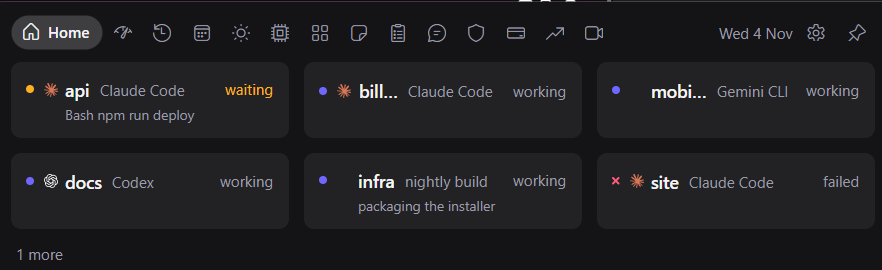
Your agents
A row for every Claude Code, Codex, Cursor, Copilot CLI, OpenCode, Factory Droid, Gemini CLI, Antigravity CLI, Qwen Code and Kiro CLI session: working, waiting for you and for what, done or failed. The pill grows when one finishes or asks for approval, and with a setting, Allow and Deny answer a Claude Code or Codex request from the panel.
Your AI limits
Claude's 5-hour and weekly limits and Codex's, each with its reset countdown, a pace forecast and how old the number is. The closed pill carries the fullest limit as a gauge and a dot per session, so you see a limit coming without opening anything.

Your day
The next meeting with a countdown and a Join button, today's list and the month, from calendar links you paste: Microsoft 365, Outlook.com or Google. Five minutes before a meeting, the pill grows.
Your music
What's playing in any app that shows in Windows' media controls, with its album art. Play, pause or skip from the panel instead of switching to the music app.
Your numbers
Sales from Polar and Stripe and your YouTube channel’s views with a key you paste, sales from Lemon Squeezy and Shopify through their webhooks, and a stock watchlist with no key at all. A sale alerts within seconds, and Hide amounts keeps them off a shared screen.
Click to type
Quick notes and a Markdown task list, clipboard history, unit conversion and maths, and an Ask tab that chats with Claude or ChatGPT on your own API key. The panel takes focus only when you click into one of these.
Tools, and the Trust tab
The weather, a timer, stopwatch and Pomodoro, your PC's CPU, memory, disk, network and battery, a grid of your shortcuts and a shelf for files. The Trust tab lists each network use, whether it's on, and when it last went online and to which host.
Three themes
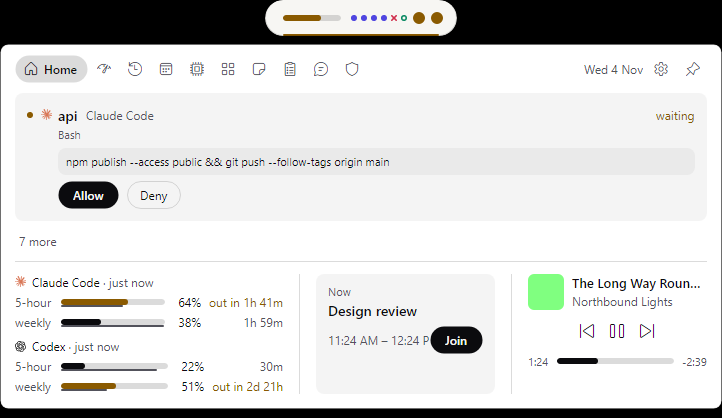
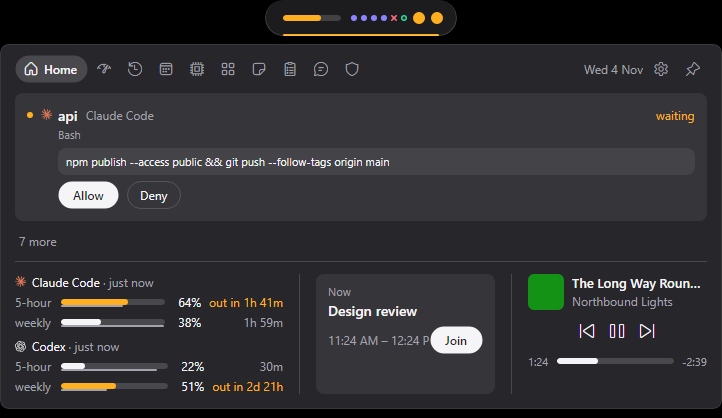
Midnight, Graphite and Porcelain. The pill stays black in each; the panel's card changes.
- Midnight
 Graphite
 Porcelain
Built to be trusted
- It never reads your AI sign-ins. Claude's limits come from Claude Code's status line, Codex's from its session logs, and agent status from each tool's documented hooks. A test fails on code that tries.
- It goes online for eleven listed uses and no more. Each one but the update check stays off until you turn it on or paste its link or key, and the Trust tab shows them all.
- It takes focus only when you click into something to type, hides over fullscreen games and presentations, and reserves no screen space.
- Your agents' settings come back exactly as they were: uninstalling its hooks restores each config file byte for byte.
It's all written down: privacy, terms, refunds, support, data handling.
Questions
- How does the trial work?
- Overglance works in full for 7 days from the first time it runs on a PC. After that, the panel shows only where to buy until you paste a key.
- What does $9.99 buy?
- One license key for up to 3 PCs you use, and every update of this major version. The purchase and the key go through Polar.
- Where do updates come from?
- Once a day it asks the public overglance-releases repo on GitHub for a newer version. A setting turns the check off.
- Will it sit on top of a game or a presentation?
- No. Overglance hides over fullscreen apps, and it never takes focus unless you click into something to type.
- What if it isn't for me?
- A full refund within 14 days of purchase, no questions asked.