2026-10-25 · CLAUDE-CODE · WINDOWS · CSHARP · AVALONIA
Finding the processes Claude Code leaves running on Windows
Windows never cleans up after a dead parent. How Sweepling ties each orphan back to the Claude Code session that started it, and why it asks before closing anything.
A scan of my machine, 38 hours after boot, found a next dev server that had held port 3001 for 35 hours with nothing connected to it. An ng serve had sat idle for 11 hours. Around them were 20 bare tail.exe, grep.exe and sh.exe rows in Task Manager, with nothing to say which project they belonged to.
All of them came from my Claude Code sessions: dev servers, tail -f watchers on task output files, small scripts. The sessions had ended and the processes kept running. There's an upstream issue about it, #62659, and a bot closed it as not planned.
So I wrote Sweepling, a Windows tray app that notices these leftovers and closes them once you confirm.
Why this is a Windows problem
On Linux an orphan is adopted by init or a subreaper, and a cleanup tool can end a whole process group in one call. cc-reaper does this well on macOS and Linux.
Windows does neither. When a parent exits, its children keep running and keep the dead parent's PID in their own process record. Windows also reuses PIDs, so a few minutes later that number can belong to something unrelated. Task Manager's tree only nests a process under a parent that's still alive, so an orphan shows up as one more top-level node.exe.
That gives the first rule: a process's parent is gone when its PID is missing, or when that PID now belongs to a process that started after the child.
Proc? ParentOf(Proc p) =>
    p.ParentPid != p.Pid
    && byPid.TryGetValue(p.ParentPid, out var parent)
    && parent.Started <= p.Started ? parent : null;
You can run the same check in PowerShell without installing anything:
$all = Get-CimInstance Win32_Process
$byId = @{}; $all | ForEach-Object { $byId[$_.ProcessId] = $_ }
$all | Where-Object { $p = $byId[$_.ParentProcessId]; -not $p -or $p.CreationDate -gt $_.CreationDate } |
  Where-Object Name -in 'node.exe', 'tail.exe', 'grep.exe', 'bash.exe', 'sh.exe' |
  Select-Object ProcessId, Name, CreationDate
It will also list orphans that have nothing to do with Claude Code. Telling those apart is the hard part.
Tying an orphan to a session
Plenty of programs start a helper and exit on purpose, so an orphan on its own isn't a leftover. Sweepling only offers a process it can tie to a Claude Code session, and it has three ways to do that, strongest first.
- The family tree. Every few seconds Sweepling takes a snapshot of your processes and records which session each one descends from. Ancestry is only visible while the parents are alive, so it learns early and keeps what it learned after a parent exits.
CLAUDE_PID. Claude Code puts its own PID in its children's environment. Sweepling reads another process's environment from its PEB. That memory belongs to the other process, so every size and pointer in it is treated as untrusted and every read is bounded.- Command-line rules. Programs run from Git Bash are the awkward case: an MSYS2 process hands Windows only a handful of environment variables, and
CLAUDE_PIDisn't one of them. For those, a small rules file matches things like agrep --line-bufferedfrom Git Bash's folder, or a command line that points into Claude Code's temp folder.
When Sweepling can't tell whether a session has ended, it treats the session as running. A wrong "running" only delays an offer. A wrong "ended" offers someone's live work.
Strays that share one dead parent and started within ten seconds of each other become a group, together with everything under them, and you close a group as one.
Is it still in use?
Belonging to an ended session still isn't enough. A group waits until its parent has been gone for a minute, and it's never offered when:
- anything in it has an established TCP connection, like a dev server a browser tab is still talking to;
- anything in it is a windowed app. Sweepling reads the subsystem field in the exe's PE header, and an exe it can't read counts as windowed;
- everything in it is on the protect list, which covers things like MSBuild nodes and the .NET build servers.
Sweepling never looks at CPU or memory use. A busy process is often a build someone is waiting for, and "kill whatever is using a lot of CPU" has ended background builds in other cleanup tools.
Asking first
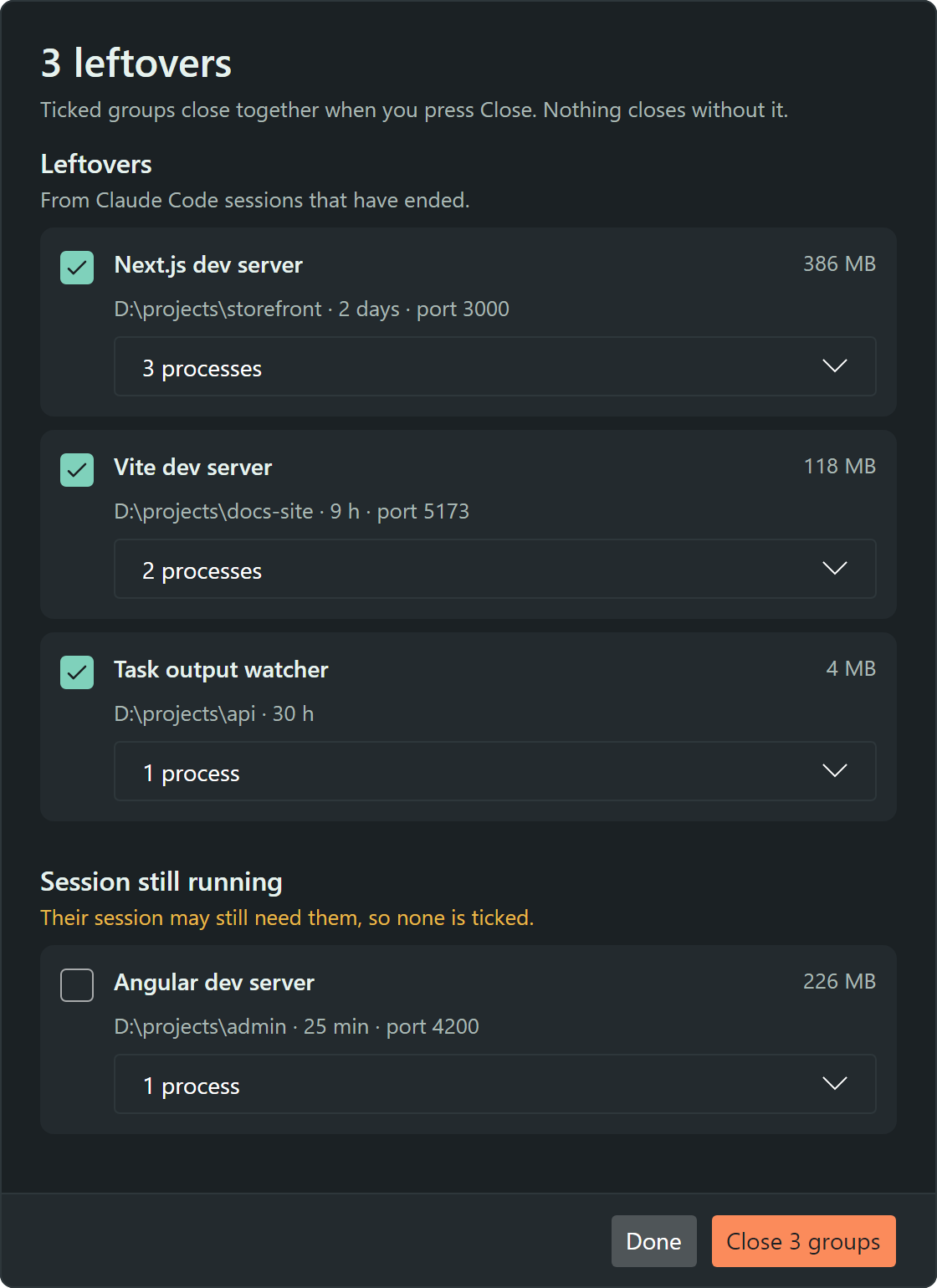
Sweepling never closes anything you haven't confirmed, and there's no auto mode, setting or flag to change that. Leftovers of ended sessions start ticked. Strays of a session that's still running get their own section and are never ticked by default.
Right before closing a group it checks again. Nothing in the group may have gained a connection since you looked, and each PID must still belong to the process you were shown, compared by start time, because the PID you saw thirty seconds ago could be a new process by now. It closes parents first, so a supervisor can't restart a child it just lost. Each close goes into a local log with command lines masked, since command lines carry tokens and private paths.
Keeping it cheap
An app that cleans up leftovers shouldn't cost more than they do. Sweepling is .NET 10 and Avalonia 12, published with NativeAOT as a single process. Avalonia's GPU renderer held about 60 MB from launch whether a window was open or not, so Sweepling renders in software. In the tray it idles at about 17 MB of private bytes, and about 23 MB once its window has been opened. Its only network call is the update check against GitHub Releases, and there's no telemetry, because it can see every command line on the machine.
What a week of using it found
I've run it every day since it worked. On its busiest day it found 22 groups on my machine: 9 task output watchers, 9 of their grep filters, a Next.js dev server, two Angular dev servers and a shell script. I closed all of them. One was an Angular dev server I had completely forgotten about. The number I watch most is how many it offered that were still in use, and so far that's zero.
Try it
You need Windows 10 or 11 on x64. Download sweepling-setup-win-x64.exe from the latest release. It installs for your user only, needs no admin rights, is signed, and keeps itself up to date. It sits in the tray as a straw brush. When the brush shows a count, click it, untick anything you still want, and press Close. To see what it would offer without closing anything, run Sweepling.exe --scan > scan.json.
For now it covers the Claude Code CLI only. On macOS or Linux, use cc-reaper, which does much more. If you already know which port is stuck, npx kill-port 3001 is faster than any tray app.
The code is Apache-2.0 on GitHub. The most useful issue you could open describes a leftover Sweepling missed, or one it offered while you were still using it.